
Writing to Microsoft Word
Firstly a warning – this creates doc documents that can be opened in Word 2010 but are strictly speaking 03 iterations hence the doc suffix
First need to load in the library for Microsoft Word (this is 2003 version)
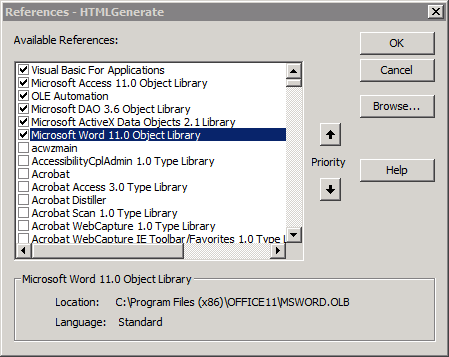
Then you are free to open and manipulate the items in Microsoft word..
Private Sub Command_Click()
On Error GoTo Err_Command_Click

    Dim wrdApp As Word.Application
    Dim wrdDoc As Word.Document

    Set wrdApp = CreateObject("Word.Application")
    Set wrdDoc = wrdApp.Documents.Add ' create a new document
    wrdApp.Visible = True
‘this line can be altered to not open the document on the screen

    With wrdDoc

        With .Styles(wdStyleHeading1).Font
            .Name = "Arial"
            .Size = 16
            .Bold = True
            .Color = wdColorBlack
        End With
        With .Styles(wdStyleHeading2).Font
            .Name = "Arial"
            .Size = 12
            .Bold = True
            .Color = wdColorBlack
        End With
        With .Styles(wdStyleNormal).Font
            .Name = "Arial"
            .Size = 10
            .Color = wdColorBlack
        End With

        .Content.ParagraphFormat.LineSpacingRule = wdLineSpaceExactly
        .Content.ParagraphFormat.LineSpacing = 10

        .Range(0).Style = .Styles(wdStyleHeading1)
        .Content.InsertAfter "ThIS SHOULD BE HEADING1"
        .Content.InsertParagraphAfter

        .Range(.Characters.Count - 1).Style = .Styles(wdStyleHeading2)
        .Content.InsertAfter "THIS SHOULD BE HEADING2"
        .Content.InsertParagraphAfter

        .Range(.Characters.Count - 1).Style = .Styles(wdStyleNormal)
        .Content.InsertAfter "THIS SHOULD BE NORMAL"
        .Content.InsertParagraphAfter

        .SaveAs ("C:\CreatedWordDoc.doc")
        .Close ' close the document
    End With    ' With wrdDoc

    wrdApp.Quit ' close the Word application
    Set wrdDoc = Nothing
    Set wrdApp = Nothing

Exit_Command_Click:
    Exit Sub

Err_Command_Click:
    MsgBox Err.Description
    Resume Exit_Command5_Click
An article on libraries specifically related to MS Access is available here
allenbrowne.com