Web Accessible Database Centric Workflows – A simple target for True Digital Transformation (Succession Resilient)

Many organisations continue to go through a process of digital transformation – but can we more clearly define the principle measure of success for this strategy — Too often for many organisations the process stalls at the “file-based” stage. Spreadsheets, shapefiles, and local data silos persist after the move to cloud-based systems has taken place because although the platform on which data is stored is now a cloud server the continual use of file based storage continues to limit distribution of information. This is because real transformation comes not from the cloud itself, but from structured, version-controlled, and web-accessible enterprise databases.

Overall Strategy : Move from Network Accessible Digital Single Files to Web Accessible Enterprise Grade Database Workflows. At the heart of a reliable digital infrastructure lies databases. Unlike flat files, relational databases ensure data integrity through enterprise grade security and version control. This improves the following.

  • Minimises potential file curruption from multiple users editing the same dataset at the same time.
  • Improves ability to search through large datasets.
  • Complete traceability of every transaction.
  • Recovery after failure or interruption.
  • True concurrency and reliability for multi-user environments improving version control truly solving reconciliation issues.
  • For spatial data, PostGIS extends PostgreSQL to store and query geometry objects natively — perfect for organisations managing maps, assets, or infrastructure data.
  • Web-Enabled Editable Databases accessible through Browser-Based Interfaces. Once data is stored in relational databases, the next step is to make them accessible to users through secure, web-based interfaces. This can be done using a wide range of established and well-supported technologies and organisations have the option of running these in parallel.

    These interfaces allow staff to edit records, maintain registers, update project systems, and manage operational datasets directly using familiar web forms and tables, rather than passing around emailed spreadsheets or local files.

    The essential point is that the database remains authoritative, while the web interface provides controlled, permission-based access.

    This approach brings multiple organisational benefits:

  • Data is always current, and everyone sees the same version.
  • Editing workflows can be controlled with user roles and permissions.
  • Versioning and audit trails become standard practice.
  • The organisation is no longer reliant on offline documents or duplicated file stores.
  • Backups can be automated
  • For some organisations, this might take the form of customised dashboards or record-management forms. For others, it may use platforms such as Adminer, phpMyAdmin, pgAdmin in hosted mode, or bespoke internal systems and low-code form builders.

    The key outcome is that data becomes centrally held, centrally maintained, and accessible in a structured way through the browser — allowing non-technical staff to work confidently with shared information.

    Recommended Implementation Order

  • Stage 1: Establish web hosting control (cPanel / Plesk / DirectAdmin) BEGINNER
  • Stage 2: Establish a communication layer (WordPress for documentation & publishing) BEGINNER
  • Stage 3: Experiment building lightweight task specific browser tools to reduce dependency of desktop utilities BEGINNER
  • Stage 4: Establish enterprise data backbone (PostgreSQL + PostGIS) ADVANCED
  • Stage 5: Establish spatial data publication (GeoServer / mapping clients) ADVANCED
  • Stage 6: Establish controlled data editing interfaces (admin dashboards / low-code) ADVANCED
  • Stage 7: Consider Client Portals VERY ADVANCED

  • Stage 1 – Provide simple web hosting management access for users – for example cPanel: Software that allows delegation of Simple Web Management Tasks to Domain Users

    cPanel is a platform (think administration dashboard panel) known in the trade as a web hosting manager – Web Hosting Management software is now so good that it provides a simple Web administration layer that is consistent across many cloud providers and which is learnable by most intelligent domain users. Importantly it allows domain users to have some agency over the management of simple tasks related to their infrastructure and applications. Many small to medium organisations rely on cPanel hosting environments to create applications and deploy databases. This allows applications and databases to be hosted and moved to other cloud providers either on cPanel or on a number of alternative Web Hosting Management Software alternatives.

    Here I give cpanel as an example but similar alternatives such as Plesk and DirectAdmin exist for which there are hundreds of cloud providers..


    Stage 2 – WordPress: Content Management Software perfect for Procedure Documentation or Public Outreach

    WordPress serves as a communication front-end in a digitally transformed organisation. WordPress as a content management system actually sits on top of a relational database, usually MySQL or Mariadb. It functions as a reliable publishing and engagement platform — ideal for sharing procedural notes, updates, and policy information with staff, partners, or the public seamlessly handling version control.

    Running typically on MySQL or MariaDB, WordPress offers a straightforward content management system that integrates easily into standard web hosting environments. Using cPanel, Plesk, or equivalent systems means routine administrative tasks — backups, SSL certificates, plugin updates — are simple and repeatable.

    In this structure, WordPress becomes the information delivery layer: the digital noticeboard where well-governed, database-backed systems meet accessible public communication.


    Stage 3 – Vibe Coding : Building lightweight task-specific browser tools to reduce dependency on desktop utilities and local IT

    By default cPanel will publish any file named index.html placed in the server directory named the same as the domain or sub-domain and depending on how you decide to setup cpanel you may have unlimited ability to setup sub domains which means unlimited potential applications.

    Experiment with your favourite AI software and asking it to write a simple html / javascript and css index.html file that can be used to merge pdf documents. Take this file and using cPanel place it on the server within the directory relating to your domain or sub domain. On any computer in the world now navigate to the domain url and hey presto that application is available. Javascript runs in the browser of the client machine so there is no issue with resources beyond the initial hit.

    Combine 2 PDF Vibe Coding Example


    Stage 4 – Postgres – Free Enterprise Database Provision

    Postgres has some of the best tooling for spatial data – a characterisitic particularly important for professions dealing with the built environment. Installation of postgres is easy and free but setting up web dashboards is a slightly more advanced topic. Generally the setup is harder than administration so I recommend you seek help with this process. Your IT section may wish to separate the server provision for this.


    Stage 5 – GeoServer: Sharing Maps and Spatial Layers

    Geoserver is an open source application designed to help districute spatial datasets, GeoServer adds a powerful visual layer. Again this is more advanced topic and again the initial installation and configuration is complex so please seek assistance before moving forward. Connected to the same PostgreSQL database, it serves data via WMS, WFS, or WMTS — industry-standard web mapping protocols.

    This means:

    Your GIS teams maintain a single authoritative dataset.
    Users can access maps in QGIS, MapLibre, or web apps without downloads.
    Styling and layers can be managed centrally and published instantly.
    Together, the database and map services form a robust data fabric where both tabular and spatial information are web-ready, discoverable, and always live.


    Stage 6 – Low Coding Tools – Build your own simple CRUD database systems and publish to your cpanel

    Up until now most of the suggestions have been largely open source. Tools that create Low Code CRUD applications tend not to be free and at this point you may wish to have a budget. Again this is a slightly more complicated topic as although usually using the tools is easy creating and configuring the environment to which you publish these and ensuring you can connect to the requisit databases is more advanced.

    Stage 7 – Client Portals
    Client Portals allow hundreds or thousands of people to benefit from your infrastucture possibly allowing you to magnify you efficiency by allowing clients to perform simple tasks. Such provision is however a serious undertaking and is beyond the scope of this article. Rest assured having the other stages in provides for the basis for this final stage

    Succession, Reliability and the Value of Proven Technology
    A key underpinning of this articles focus is succession and reliability — in other words, using technologies that are already widely adopted, thoroughly tested, and backed by large user communities.

    WordPress powers around 43% of all websites globally, while MySQL and MariaDB form the backbone of millions of web applications. PostgreSQL is consistently ranked among the top three database engines worldwide and is widely used in enterprise, public sector, GIS and high-reliability systems. Those databases are open source and free to install. Additionally your organisation already probably has SQL Server and Oracle that can link into bespoke web user interfaces in parallel to the systems already in place.

    Major hosting providers report uptimes above 99.9% for WordPress and MySQL-based environments, and PostgreSQL is known for its strong concurrency management, transactional integrity, and failover capabilities.

    By choosing these well-established platforms, organisations reduce risk, ensure continuity of knowledge, and make long-term system maintenance predictable and affordable.

    A Sustainable Digital Ecosystem
    The combination of a relational database, browser-based data editing, GeoServer for spatial publication, cPanel for hosting administration, and WordPress for public communication and procedure documentation provides a sustainable, transparent, and maintainable model for digital transformation.

    This stack enables enterprise-level data management without enterprise-level costs, while ensuring that:

  • All data changes are recorded and recoverable.
  • All users access the same single source of truth.
  • The public-facing narrative is clear, consistent and up to date.
  • Backup and Access security can be enforced.
  • Why Client Portals Matter (More Than You Think)

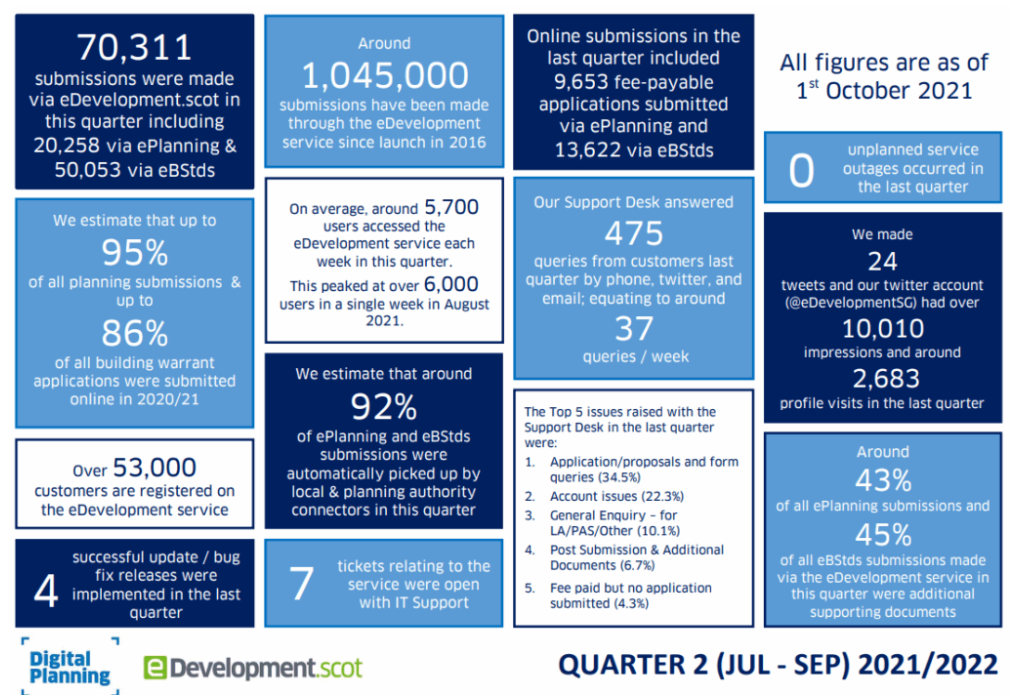
    Its difficult to underestimate the importance of client portals and hopefully the above statistics give you some impression of how important they are. These show number of application coming through eplanning (Scotland in one Quarter) They were obtained through Orkney Council’s website I couldn’t find a direct link from eplanning themselves and although I have access to more complete statistics they haven’t been officially published unlike the above. What you see though is the tremendous amount of automated work that eplanning in particular is managing. Another important example is Self Assessment Taxation – it is likely that the quality and quantity of such systems are going to steadily increase.

    Here are some reasons below why it might be a good idea to really concentrate on them although I think the case for them is now beyond doubt.

    If your clients still rely on email threads, ad-hoc file links, and the occasional “just checking in” call, there’s a better way. A client portal centralises communication, documents, timelines, and approvals in one secure place. It’s not just nicer—it’s operationally smarter.

    What is a client portal, really?
    A client portal is a secure, branded website where clients can log in to see exactly what matters to them: project status, documents, messages, invoices, tasks, and data visualisations. Think of it as your project hub and your client’s single source of truth.

    The five biggest wins
    1) Clarity beats chaos
    One place for everything. Messages, files, versions, decisions, and deadlines live together.
    Fewer “can you resend that?” moments. Version control becomes simple and auditable.
    Instant context. New stakeholders can self-serve the backstory without pinging you.

    2) Faster decisions, fewer blockers
    Tasks with due dates keep momentum.
    Automated reminders reduce nudges and manual follow-up.
    Structured approvals (with timestamps) remove ambiguity about who signed off and when.

    3) Trust through transparency
    Real-time status shows progress without status-chasing.
    Change logs and audit trails make governance straightforward.
    Data sharing done right. Dashboards, maps, and reports are available on demand.

    4) Security and compliance made practical
    End-to-end encryption and access controls beat email attachments every day.
    Granular permissions (by project, folder, or role) reduce accidental oversharing.
    GDPR-friendly workflows: clear data retention, access requests, and redaction paths.

    5) Repeatable processes = scalable business
    Templates for onboarding, project plans, and reports create consistency.
    Automations (e.g., filing, naming, and notifications) cut admin time.
    Analytics surface cycle times, bottlenecks, and utilisation.
    How a portal changes the client experience
    “What’s happening now?” A live timeline and milestones replace guessing.
    “Where’s that file?” Searchable, versioned documents—no more digging in inboxes.
    “When will I get an answer?” Defined SLAs, visible queues, and response-time metrics.
    “What do I need to do?” Assigned actions with due dates and explanations.
    Example use cases (and why they matter)
    Planning & development projects: Share drawings, consultation responses, and decision notices with a clear approval trail. Pin a live constraints map so everyone sees the same data layer.
    Data & GIS deliverables: Publish interactive maps and dashboards—no emailing huge files. Provide a changelog when datasets update (schema changes, CRS notes, metadata).
    Professional services: Scope, proposals, invoices, and contract variations live alongside project work so commercials never drift from delivery.

    Features worth prioritising
    Secure document vault with versioning, preview, and e-signatures.
    Discussions tied to artefacts (comment on the map/report, not in a separate email).
    Task & milestone tracking with dependencies and automatic reminders.
    Data embeds (maps, dashboards, analytics) that render inside the portal.
    Granular permissions (client, partner, internal; read vs. edit).
    Search & audit logs that are actually usable.
    Branding and custom domains to feel like your service, not a third-party tool.
    API & integrations (drive, email, billing, helpdesk, issue trackers).

    Metrics to prove ROI

    Track these for the first quarter after launch:

    Email volume per project (should drop).
    Average approval time (should shorten).
    On-time milestone rate (should rise).
    Client satisfaction (CSAT/NPS) (should improve).
    Rework due to version confusion (should fall).
    Time to onboard a new stakeholder (should be minutes, not days).
    Common objections (and how to answer)
    “Clients won’t log in.” They will if the portal is the easiest way to get answers, files, and approvals. Reduce friction with SSO and smart notifications that deep-link to the right place.
    “Email works fine.” Email is fine for notes; it’s poor for records, approvals, and version control. Portals turn communication into a system of record.
    “It’s another tool to manage.” True—so choose a portal that integrates with your stack and templatise the setup. The first project takes effort; the tenth is nearly automatic.

      Implementation checklist

    Pick 1–2 high-leverage projects for a pilot (clear milestones, multiple stakeholders).
    Define a standard folder and naming scheme and lock it in as a template.
    Decide who sees what (roles, groups, external partners).
    Set up automations (e.g., “when a file is approved, notify X and move to Y”).
    Create two dashboards: one for clients (outcomes), one for your team (throughput).
    Write a 1-page client guide with screenshots and a 10-minute onboarding call.
    Measure the before/after using the metrics above.

    Conclusion
    Client portals should pay for themselves in fewer delays, cleaner records, faster decisions, and happier clients. They replace inbox archaeology with clarity, and they turn your process into a repeatable product. If you want to deliver work with less friction—and prove the value you deliver—build your next project around a portal.

    A Practical Framework for Digital Transformation

    Digital transformation is often described as a destination — a point at which an organisation becomes “fully digital.” In reality, it’s not a destination at all. It’s a continuous journey of adaptation, integration, and improvement.

    Based on experience across different industries, here’s a framework that captures the core strategies for digital transformation and shows how they can be applied in practice.

    1. Build a Strong Data Foundation

    Transformation begins with data. Moving from spreadsheets, ad hoc files, or legacy silos into industrial-grade databases provides the reliability and scalability organisations need.

    Why it matters: Strong databases ensure integrity, security, and a single source of truth.

    What to do: Standardise how data is ingested, stored, archived, and protected. Make resilience and compliance a given, not an afterthought.

    2. Automate for Efficiency

    Repetitive, low-value tasks consume time and create bottlenecks. Automation — through scripts, workflow engines, or robotic process automation — removes these inefficiencies.

    Why it matters: Frees up staff for creative and strategic work.

    What to do: Target high-volume, rule-based processes first, then refine automation with continuous feedback loops.

    3. Integrate and Connect Systems

    No organisation runs on a single system. Value comes from connecting multiple programs so that information flows across functions.

    Why it matters: Breaks down silos and unlocks richer insights.

    What to do: Use APIs, middleware, and modular architectures to allow systems to “talk” to each other without creating rigid dependencies.

    4. Empower Domains While Aligning Accountability

    Digital tools should serve business domains, not the other way around. Allowing each domain to create unique solutions ensures relevance — but this must be coupled with clear accountability for outcomes and budgets.

    Why it matters: Encourages ownership and reduces waste.

    What to do: Balance flexibility with central governance so that innovation doesn’t lead to fragmentation.

    5. Align Responsibilities Vertically

    Too often, digital accountability is spread horizontally across functions — meaning no one truly owns results. Instead, embed end-to-end responsibility within vertical business units.

    Why it matters: Each team can own and deliver on its digital performance.

    What to do: Define clear KPIs and responsibility matrices for every unit.

    6. Standardise Technology Choices

    Every new tool, database, or programming language adds complexity. While some diversity is healthy, standardisation reduces costs and makes systems more sustainable.

    Why it matters: Minimises technical debt and improves long-term interoperability.

    What to do: Regularly review and rationalise platforms, aiming for consistency without stifling innovation.

    7. Prioritise User Experience

    Digital systems succeed only if people use them. A web-based user interface makes tools accessible across devices, locations, and roles.

    Why it matters: Improves usability, inclusivity, and adoption.

    What to do: Apply consistent design standards to ensure a unified user experience across systems.

    8. Create Customer Portals

    Transformation should extend beyond internal systems. Customers increasingly expect self-service, transparency, and direct access to information.

    Why it matters: Builds trust and reduces demand on support teams.

    What to do: Build customer portals with integrated feedback mechanisms for continuous improvement.

    9. Adopt a Continuous Transformation Mindset

    Finally, the most important principle: digital transformation never ends.

    Why it matters: Technology, markets, and customer expectations constantly evolve.

    What to do: Embed agility into culture, train staff in digital literacy, and continuously scan for emerging technologies that could add value.

    The last step is always Digital Client Portals when you have all of your ducks in a row you can implement a proper Clent Portal – which could turn your IT estate into a profit centre rather than an additional burden.

    Conclusion

    Digital transformation isn’t about implementing a few shiny new systems — it’s about reshaping the way an organisation operates, collaborates, and delivers value.

    By focusing on foundations (data, infrastructure, integration) → operations (automation, accountability, standardisation) → experience (UX, customer access) → mindset (continuous evolution), organisations can create a sustainable digital framework that evolves with them.

    Because in the end, transformation is not a project. It’s a way of working.